Naming Fonts and Families
A font's name places it within a family. Even if you have created only one font, its identity has two levels: the family it belongs to and the style it represents. Establishing those names early gives the working file an identity you can recognize when saving it, opening several fonts, or preparing output.
Applications use a font's internal names to group it and its style links to find related styles. Those identifiers need to agree with the role you intend the font to play.
Font Identity
Consider a fictional family called Orchard Sans. The name Orchard Sans Bold identifies a family, Orchard Sans, and a role within it, Bold. Other members can share the family name while having different style names.
This two-level identity gives you two kinds of property to manage. A family-property is intended to remain consistent across the family. The family name is the first example. A font-property belongs to an individual member: its style name and its weight, width, and slope distinguish it from its siblings.
The distinction concerns the intended meaning of the values. It does not mean that changing one open font automatically updates every other font in the family. If related fonts are stored separately, keeping their shared values consistent remains part of managing the family.
Line-spacing values provide another example of family-level coordination. Related styles used together normally need a consistent vertical framework so that changing style does not unexpectedly change a paragraph's rhythm. FontLab highlights divergent family-dimension values; see Font Metrics and Glyph Metrics.
Font Info
Choose File > Font Info... to open the Font Info dialog for the current font. Its sidebar organizes pages for names, dimensions, and other font information. Select Names for the naming work in this chapter.
Font Info contains both shared information and values associated with an individual design. Confirm that the dialog refers to the font you intended to name before changing its values.
A provisional name is sufficient while a design is developing. It still needs to be coherent: the family name identifies the group, and the style name identifies this member within it. You can refine both as the project takes shape.
The Font Naming Model
Four-style groups and typographic families
Two naming models coexist because applications do not all organize fonts in the same way.
The older RIBBI model takes its name from Regular, Italic, Bold, and Bold Italic. A linked group has at most one member in each role. A word processor can select among them with its Bold and Italic buttons. The group has a family name, and each member has a subfamily name identifying its role.
In OpenType naming terminology, those strings are family name ID 1 and subfamily name ID 2. A name ID identifies the kind of string in the name table; a glyph ID, by contrast, identifies a glyph in the font’s ordered collection.
The four-style model cannot describe every distinction in a larger family. A family might contain several weights and widths, each with an italic companion. Those members need broader grouping and more descriptive style names than four button states can provide.
The Typographic Family Name (TFN) provides that broader family identity. Its partner, the Typographic Style Name (TSN), also called the typographic subfamily name, identifies a member within that family. These correspond to name IDs 16 and 17. They allow a family to include styles such as Light, Condensed Medium, and Semibold Italic under one typographic family name.
The two models can describe the same font at different levels. Its typographic family may be Orchard Sans, while its four-style group needs a more specific name to distinguish it from other groups in that family. The Styling Group Name (SGN) identifies that smaller group. A broad family and a four-style group are not necessarily the same collection.
For a simple Regular, Italic, Bold, and Bold Italic family, the typographic family and style-group names can coincide. For a larger family, deciding which fonts share each style group requires attention to the actual members.
Full and PostScript names
The Full Font Name (FFN) is the complete human-readable identity of an individual font. It corresponds to name ID 4 and conventionally combines family and style, as in Orchard Sans Bold Italic. A default Regular style may use the family name alone in its full name.
The PostScript name, name ID 6, is a technical identifier. It contains no spaces and uses a restricted character set. A conventional form for the same example is OrchardSans-BoldItalic.
These names can be derived from the family and style, but they are stored identifiers. An operating system does not repair an incorrect full or PostScript name merely because the family and style names look correct. FontLab provides commands to build the related fields, after which you can inspect their results.
WWS naming
The Weight-Width-Slope (WWS) model groups fonts by those three attributes. Additional family and subfamily strings, name IDs 21 and 22, can supply WWS-compatible grouping when typographic names include other distinctions, such as optical-size variants.
WWS is another compatibility layer, not another name you must invent for every font. The basic naming workflow below establishes the typographic identity and four-style relationship; detailed production requirements are addressed with family building and export.
Font Names in FontLab
Activate the intended font, choose File > Font Info..., and select Names. Family name is the family-property shared by related members; Style name is a font-property identifying this member. Keep that distinction when reviewing the generated names.
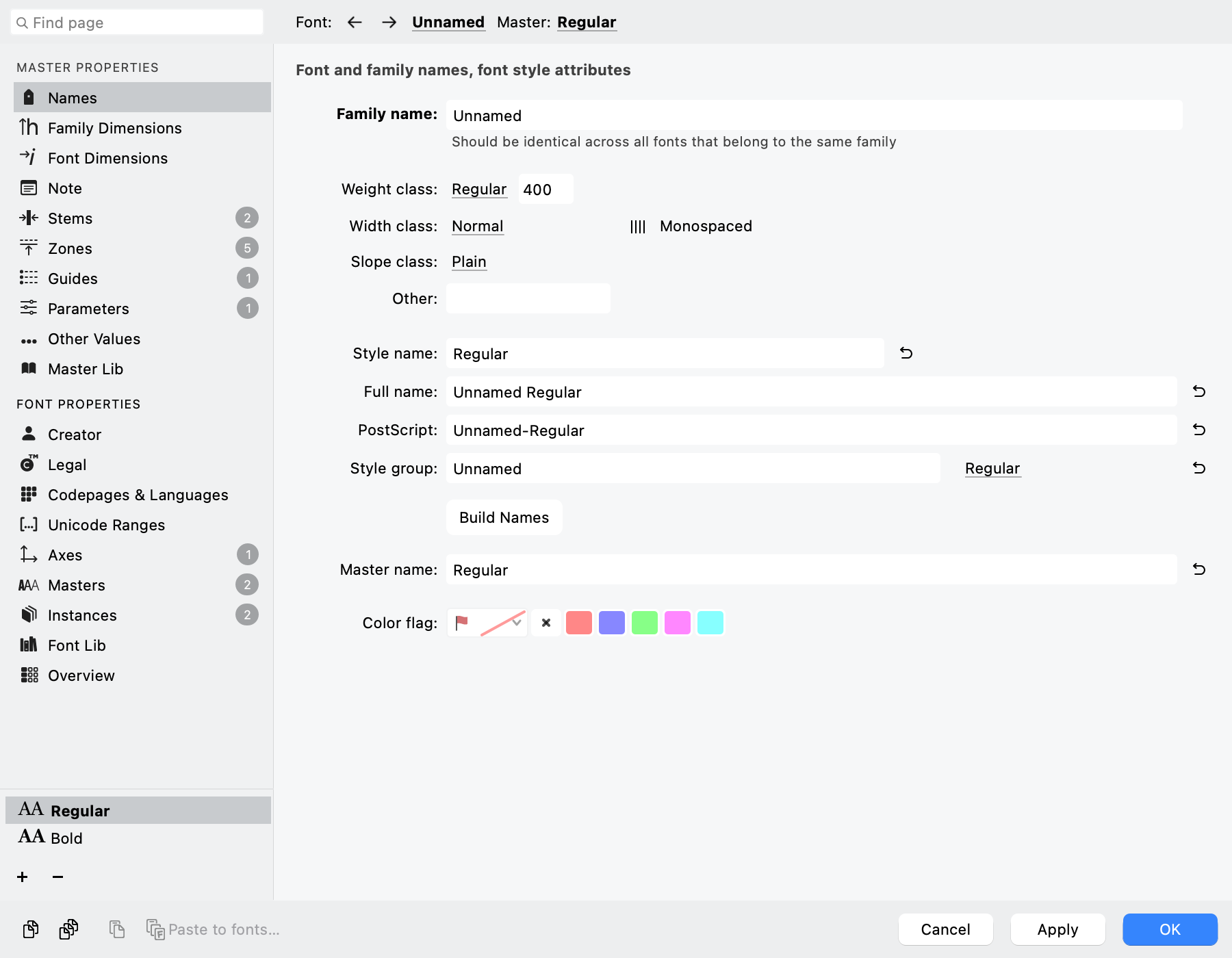
The Names page places family, style, PostScript, and style-group fields together, with Build Names below them.
Design attributes
The design attributes describe the member and help construct its style name. Weight class identifies weight, such as Regular (400) or Bold (700). Width class runs from condensed to expanded, with Normal for ordinary width. Slope class identifies Plain, Italic, or Oblique; it is separate from the drawing-space italic angle. For ordinary style linking, use Plain or Italic according to the member's role.
Other adds a descriptor such as Text or Display. Monospaced declares that the design uses fixed character widths. These settings describe the font: they do not change stroke thickness, stretch outlines, set the italic angle, or equalize advance widths. Their values must agree with the drawings and spacing.
Naming a regular member
- Enter your family name, for example
Orchard Sans. - Choose Regular, Normal, and Plain for Weight, Width, and Slope; leave Other empty unless needed.
- Use the individual build button beside Style name, identified in Quick Help as Build Style name, and inspect the result.
- Click Build Names, then check Style name, Full name, PostScript, Style group, and Style link together.
- For this regular member, confirm the intended Style group and Regular link. Apply Font Info and save the font.
Building names and style links
Build Names derives related identifiers and, on an ordinary click, also rebuilds Style name from the attributes. Record a custom style name before using it and inspect the result. To keep that custom name, use the individual buttons beside Full name, PostScript, and Style group instead. These per-field build controls are also referred to as Auto controls. Recheck dependent fields whenever family or style changes.
Character counts help inspect name length. The PostScript field accepts 63 characters, but that capacity is not a compatibility recommendation for every destination. Keep technical names concise and check the intended output requirements. Full names can contain spaces; PostScript names cannot.
Style group identifies a four-style group; Style link assigns Regular, Italic, Bold, or Bold Italic. An ordinary four-member family can share a group name with distinct roles. Do not put additional weights or widths into the same four slots; see From Fonts to Families.
Option/Alt-clicking Build Names derives a separate group from the style and sets its link to Regular. It still generates names, so inspect them afterward. Master name also contributes the filename when an individual master is exported.
Translated names and other access
Use the language-icon control beside Family name, Style name, Full name, or Style group to enter translations. Family translations are shared across masters; style and full-name translations can differ by master, so check the active master. PostScript and Master name have no translations through this control. Translations are retained in VFC/VFJ and exported to supported OpenType name records; they do not change the interface language.
The Font Info panel offers compact access to key naming properties. Predefined-instance naming overrides are covered in Defining and Generating Instances.