Fonts and Encodings
Type a word in a document, then change its font. The word remains the same, although its appearance may change considerably. The letters may become wider, darker, or more elaborate, yet the application still has the same text to search, copy, and edit.
That everyday operation depends on a separation between the identity of text and its visible form. Understanding the separation makes it easier to see what a font supplies and what you create when you design one.
The Role of Fonts
Unicode identifies characters by codepoints: numbers such as U+0061 for lowercase Latin a. These numbers identify the text independently of its appearance.
The codepoint for a identifies a character, but it does not specify the shape of its rounded body and upper stroke, or the space it needs beside another letter. Those are matters for the font.
A font is structured data that software uses to display or print text. It provides visual forms called glyphs, together with information about their spacing and arrangement. The data is commonly delivered in a font file. Its purpose extends beyond supplying pictures: the application also needs to know how the forms belong together in text.
Consider the word film. The document contains a sequence of characters. To display it, the application's text engine finds appropriate glyphs in the selected font. It may then use the font's rules to select a different form for a particular combination, and it calculates where the resulting glyphs belong. The shapes are finally converted into marks on the screen or printed page.
The text engine and rasterizer perform the selection, arrangement, and conversion to pixels described further in Font Structures. The font supplies information for these operations; the software interprets it. Which rules are used can depend on the text, its language, the application's capabilities, and the typographic settings selected by the user.
Change the font used for film, and the application can select different drawings with different spacing while preserving the word's character sequence. The word may occupy more or less room, and its appearance may become more restrained or more expressive. The text itself has not been rewritten.
You can see this distinction in any text editor that lets you choose a font:
- Type
filmand select the word. - Change the font. Compare the letter shapes, spacing, and overall width.
- Copy the word into a plain-text document. The characters still spell
film.
A font need not cover every character that a document contains. Unicode identifies characters across many writing systems, while an individual font provides a chosen set of glyphs. When a font lacks a needed form, an application may use another font or display an indication that a glyph is missing. Support for Unicode does not mean that every font contains a drawing for every Unicode character.
For the type designer, this gives the work two connected responsibilities. The drawings must express the intended design, and the font must provide the information that lets software select and arrange them appropriately.
Characters and Glyphs
A character belongs to the text. A glyph belongs to a font's representation of that text. In a simple case, a character maps to one glyph and that glyph supplies the expected visible form. The distinction becomes more useful when the relationship is not one to one.
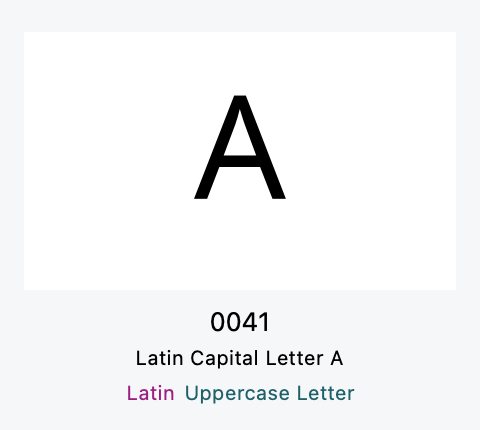
The Unicode popup identifies the character U+0041 independently of the typeface’s particular drawing of A.
Several forms of one character
A font can contain more than one glyph for the same character. It might provide both a single-storey and a double-storey form of lowercase a, or an ordinary capital and a more elaborate swash form. These are choices about appearance within the design. Selecting an alternate need not replace the underlying character with a different one.
Small capitals provide another example. Small-capital glyphs have capital-letter forms designed to work at a smaller height. When an application applies a font's small-capital substitutions to lowercase text, it selects those glyphs while retaining the lowercase characters in the text. A change in presentation is different from editing the text to uppercase.
Some choices of glyph form are required by the writing system. In Arabic, many letters have different forms according to their joining context. The text engine uses that context to select an appropriate form. The reader sees a connected word; the document does not need a different character for each ordinary contextual appearance of a letter.
The same character can also look different simply because a different font is selected. A roman a and an italic a may come from separate fonts. A stylistic alternate may instead be another glyph within the same font. Both cases preserve the distinction between character identity and the form used to display it.
One glyph for several characters
A ligature is a glyph that represents a combination of characters. In the word film, a font may provide an fi ligature drawn as one coordinated form. When the text engine selects it, one glyph takes the place of the separate f and i glyphs in the displayed sequence. The source text can still contain the two characters f and i.
This matters to the design. The combined form can resolve a collision or an awkward relationship between the ordinary drawings. Its job is to present the combination appropriately, without requiring the writer to change the spelling of the word.
Ligatures are one example of a broader relationship: a run of characters may produce a different number of glyphs. The shapes needed for display are determined by the text and its rendering rules, rather than by a requirement to draw one separate picture for every stored character.
To see the ligature substitution, use a font with an fi ligature in an application that offers standard ligatures. Type film, then turn standard ligatures off and on. Watch the f and i: their drawings may combine while the text remains unchanged. If nothing changes, check that the font contains the ligature and that the feature is enabled in the view you are using.
Glyphs without a character assignment
An alternate form or a ligature often has no direct Unicode assignment in the font. It is selected by a rule after the text engine has found the initial glyphs for the characters. A glyph without a codepoint is therefore not necessarily unfinished or inaccessible. Its intended access may be through another glyph or a sequence of glyphs.
OpenType features support this selection; they are introduced in Font Structures. The important relationship is that a font can contain more visual forms than it exposes directly through its character mapping.
When you design a font, you work on those forms and their relationships. You may create one default glyph for a character, several alternatives, or a glyph intended only for a particular combination. The character repertoire tells you which text the font is intended to support; it does not, on its own, tell you every glyph the design will need.
Identifying Glyphs
Three identifiers occur repeatedly in font development: a glyph name, a Unicode codepoint, and a glyph index. They answer different questions about the same glyph.
Glyph names
A glyph name is a working label such as a, a.smcp, or f_i. Names let designers and production tools refer to glyphs without relying on their appearance or their position in a list. They are also used when writing the rules that connect glyphs.
Names commonly follow conventions based on the Adobe Glyph List. A period can separate a base name from a suffix: a.smcp suggests a small-capital form associated with a, and a.ss01 suggests an alternate associated with a stylistic set. An underscore can join the parts of a ligature name, as in f_i.
These labels make the relationship recognizable to a person. The suffix alone does not make a text engine substitute the glyph. The font also needs the relevant mapping or layout rule.
Every glyph in the working font has a unique glyph name. This ASCII label is its primary working identifier during design and production. Their presence in the final font file depends on the format and production choices; software can render fonts whose development names have not been retained. For the naming workflow and its tools, see Managing Glyph Names and Codepoints.
Unicode codepoints
A Unicode assignment connects a character to its default glyph in the font. A glyph named a would ordinarily be associated with U+0061. Its name and its assignment are separate properties, however: the name is not the codepoint, and a suggestive name is not proof of a correct character mapping.
An alternate such as a.ss01 can have no direct assignment because it is reached through substitution. A single glyph can also serve as the default for more than one codepoint. The mapping describes how characters initially reach glyphs; it does not describe every use of those glyphs in rendered text.
When the wrong character appears, check the glyph name and Unicode assignment separately. For example, an alternate named a.ss01 can legitimately have no Unicode assignment because a stylistic-set rule selects it. Assigning a codepoint merely to fill an empty field can change the character mapping.
Glyph indices
A glyph index, also called a glyph ID or GID, is a glyph's number in a font's glyph order. Numbering begins at zero. The GID identifies an entry in that font; it is not a Unicode number or a universal identifier for a particular letter.
The following is an illustrative development example. The GIDs are invented to show the distinction and do not prescribe an order:
| Glyph name | Direct Unicode assignment | GID in this example |
|---|---|---|
a |
U+0061 | 17 |
a.ss01 |
None | 82 |
f_i |
None | 83 |
Reordering the glyphs can change their GIDs without changing their intended character relationships. Another font may use those same numbers for entirely different forms. Names are useful working labels, codepoints connect the font to encoded text, and GIDs address glyphs within a particular font's ordered collection.
Text, Encoding Standards, and Encodings
A computer stores text as data. A character is an abstract unit of that text, such as a letter, a digit, a punctuation mark, or an accent. It has an identity independent of the shape used to display it. The lowercase Latin letter a remains that character whether it appears in a book, on a screen, or in a handwritten design.
To store characters, software needs an agreed relationship between characters and numbers. A character encoding standard establishes those assignments. Within the standard's system of numbers, a codepoint is a position that can identify an encoded character.
For example, Unicode assigns the lowercase Latin letter a the codepoint U+0061. The prefix U+ identifies a Unicode codepoint, and the following digits express its value in hexadecimal notation. That notation uses the digits 0–9 and letters A–F to write numbers. You do not need to calculate with those numbers to recognize a codepoint in a description of a font.
A shared character standard
Earlier systems covered smaller sets of characters, called repertoires. ASCII provided a limited set centered on English text. The ISO 8859 standards and Windows codepages provided different selections for particular languages and regions. Text written for one selection could be misread under another: the same stored value might be interpreted as a different character.
The problem became especially visible when files moved between systems or combined languages that one repertoire could not accommodate. A document could use mechanisms to switch between repertoires, but both the writing and reading software needed to understand those choices. Choosing a different font could not, by itself, settle what the stored values meant.
Unicode provides a shared character standard for text across writing systems. Its assignments let software identify the same encoded characters independently of the language of the operating system or the font selected for display. Its repertoire continues to grow; it is not a claim that every character anyone might need has already been encoded.
Unicode also separates character identity from typographic appearance. It does not allocate a new character every time a designer draws a different form of a. Fonts supply those forms while the character assignment stays the same.
Characters and stored bytes
Knowing a codepoint and knowing how to store it are related but distinct questions. An encoding specifies how text is represented in the data units that software stores or transmits. UTF-8 and UTF-16 are common Unicode encodings. They can represent the same text using different arrangements of those units and, ultimately, different sequences of bytes.
The distinction matters when a text file is opened. Software must interpret its bytes with the correct encoding to recover the intended character sequence. Once it has that sequence, choosing a font is a separate operation. A display problem caused by misinterpreted bytes cannot generally be repaired by changing the drawing of the letters.
One visible letter can also involve more than one encoded character. An accented letter may be represented by a base letter followed by a combining accent. This is another reason to keep the stored text distinct from the forms you see: what looks like one unit on the page need not be one unit in the character sequence.