Destinations and Font Installation
Control where converted fonts are written and when supported outputs are installed.
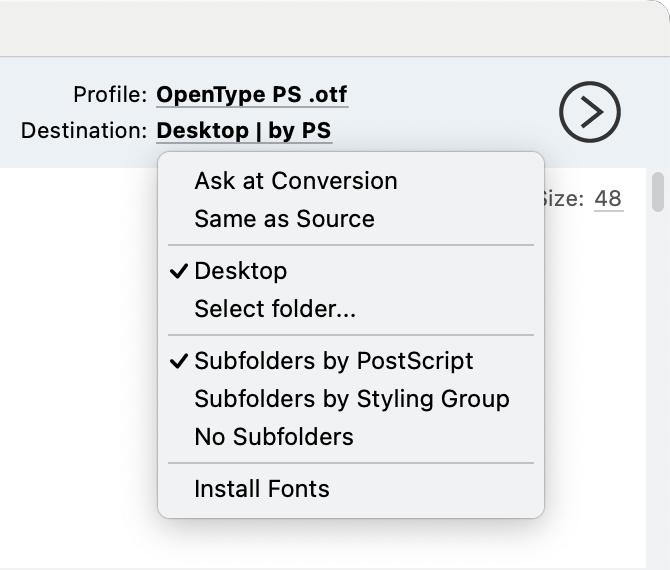
Destination menu.
Destination location
The toolbar destination menu offers:
- Ask at Conversion — choose a folder each time you convert.
- Same as Source — save each result beside its source.
- Desktop — save results on the desktop.
- Select folder… — remember a chosen folder for later conversions.
Output organization
- Subfolders by PostScript uses the family portion of each PostScript name.
- Subfolders by Styling Group uses the target's styling-group name.
- No Subfolders writes all output into the destination folder.
If a required subfolder name is already occupied by a file, TransType creates
a numbered alternative folder.
Install Fonts
Enable Install Fonts in the destination menu to install each successfully
generated OpenType font for the current user after conversion.
The installer accepts .ttf and .otf only:
- With an OpenType profile, it installs the generated font.
- With a webfont profile, it installs the base
.ttfor.otf, not the WOFF,
WOFF2, EOT, or SVG files. - It does not install Type 1 output.
On macOS, reinstalling a generated instance replaces the prior user-font bytes
at the installation destination. On Windows, TransType installs the font in
the current user's font directory and registers it with the system.
Installation failure does not erase a successfully exported file. Check the
conversion log for the installation error.
After conversion, use Reveal results in the status area to open the folder
that contains the first successful result.